Graphify reads a project and builds a knowledge graph of it: every class, function and file, and how they connect through imports, calls and inheritance. Your AI coding tool can then ask the graph a question and get back a small, focused answer, instead of opening file after file.
It is open source under the Apache 2.0 license and is written in Python. It works with Claude Code, Cursor, Codex, Gemini CLI, GitHub Copilot and more than 20 other assistants. On 20 October 2026 the repository had about 129,000 stars on GitHub, and the latest version was 0.9.92 from 16 October 2026.
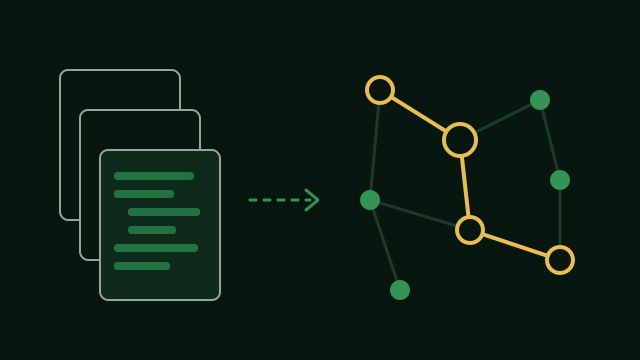
What it builds
Run it once on a folder and it writes three files into a folder called graphify-out:
- graph.html is a picture of the graph you can open in any browser. You can click, filter and search it.
- GRAPH_REPORT.md is a short report: the most connected parts of the code, the groups the code falls into, and questions worth asking.
- graph.json is the graph itself. This is the file the agent asks.
Every link in the graph is marked. EXTRACTED means it is written in the code, such as an import. INFERRED means Graphify worked it out. So you can tell what was read from what was guessed.
What stays on your computer
Code is read with tree-sitter, a parser that runs on your computer. There is no AI model in this step, nothing is sent anywhere, and no API key is needed. It knows about 40 programming languages.
Docs, PDFs and images are different. To add those to the graph, Graphify sends them to the AI model your assistant uses, and that costs tokens. If you only want the code, the update command shown below reads code files only.
The same team also sells Graphify Cloud, a hosted version with a free trial. The open-source tool on GitHub does not need it.
How the agent uses it
You can ask the graph yourself from the terminal:
graphify query "how is a signature checked?"
graphify path "UserService" "DatabasePool"
graphify explain "RateLimiter"
The first command returns the part of the graph that matches a question, capped at about 2,000 tokens by default. The second shows how two things connect. The third lists everything linked to one thing, with the file and line for each link.
To make Claude Code use the graph on its own, run this inside your project:
graphify claude installIt adds a section to CLAUDE.md and a hook in .claude/settings.json. Before Claude Code searches or opens source files, the hook reminds it to ask the graph first. Cursor, Codex and other tools get the same advice through their own rule files.
Keeping the map up to date
graphify update .
graphify hook install
graphify watch .
The first command reads the code again and changes only what changed. It uses no AI model. The second adds git hooks that rebuild the graph after every commit, checkout and merge. After a git pull, run the update command yourself. The third watches a folder and rebuilds while you work.
About the token numbers
You will see claims like 71.5 times or 79 times fewer tokens. Here is where they come from.
71.5 times is the project’s own example. On a mix of 52 files, three small GPT code projects, five papers and four images, one question to the graph used 71.5 times fewer tokens than reading all the files. The same page shows 5.4 times on a project of 4 files, and about 1 time on 6 files. The project says this plainly: the savings grow with the size of the project.
79 times comes from one user who ran it on a large codebase of about 496,000 tokens. Depending on the question, the result went from about 48 to about 714 times. It is a user’s report, not a test the project ran.
Both numbers compare a graph question with reading every file, and both leave out the cost of building the graph. The project’s website also quotes 71.5 times “per session” from one user’s setup with Obsidian. Obsidian is only an extra place to export the graph as notes. It is not what makes the savings.
A test run on itsdangerous, a small Python library, built the code-only graph in about one second, with no API key: 244 points and 567 links. The built-in benchmark said 5.7 times fewer tokens per question. On a small project that is the honest number. On a big one it can be much more.
How to install it
You need Python 3.10 or newer and uv. The package name on PyPI ends in two y letters. Other packages with similar names are not from this project.
uv tool install graphifyy
graphify install
The second command adds the Graphify skill to Claude Code. For another tool, pick it by name, for example graphify install --platform codex or graphify cursor install. Then type this in your assistant:
/graphify .In Codex the command starts with a dollar sign instead of a slash.